Build a Weather Station Part 3: RTC Time Sync over Bluetooth
Real-Time Clock (RTC)
- The time was set at compile time.
RTC.begin();
if(0){ // compile, upload once, then leave disabled to avoid resetting on every boot
  RTC.adjust(DateTime(__DATE__, __TIME__));
}
- Uncomment, upload, then comment out. Easy to forget. The clock also drifts.
- The macros compile in local time (PST). GMT is safer if the station ships to another timezone.
HM-10
OK+CONNon connect,OK+LOSTon disconnect.- Not every module sends the same strings. The app triggers on the connection event instead.
- RX goes through a 1k/2k divider.
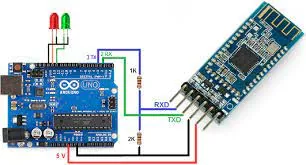
Sending Time
iPhone:
let dataToWrite = "*\(Date().timeIntervalSince1970)*".data(using: .utf8)!
self.writeValue(dataToWrite, for: thisCharacteristic, type: .withoutResponse)
Arduino:
int startPos = timeStr.indexOf('*') + 1;
int endPos = timeStr.lastIndexOf('*');
String timestampString = timeStr.substring(startPos, endPos);
if (timestampString.length() > 0) {
  double timestamp = timestampString.toDouble();
  RTC.adjust((uint32_t)timestamp);
}
Result:
OK+CONN*1701455509.2159228*
Bluetooth connected.
RTC adjusted.
2023-12-1 18:31:28
H:49.7 T:21.1 C:22.8
config.txt
- The Arduino SD library writes txt, not json.
{ "EpochTime": "1701474809.634207" }
- After a cold start the RTC resets to 2000-1-1 until the first BLE connection.
RTC Time: 2000-1-1 00:00:00
OK+CONN*1706295107.642195*
Bluetooth connected.
RTC adjusted.
2024-1-26 18:52:48
config.txt file created.
Update (May 2024)
- Time is now sent every time BLE connects, not only on the first connection.