Building a Field-Ready Leaf Angle Measurement App
A Mobile Web App for Measuring Leaf Angles in the Field
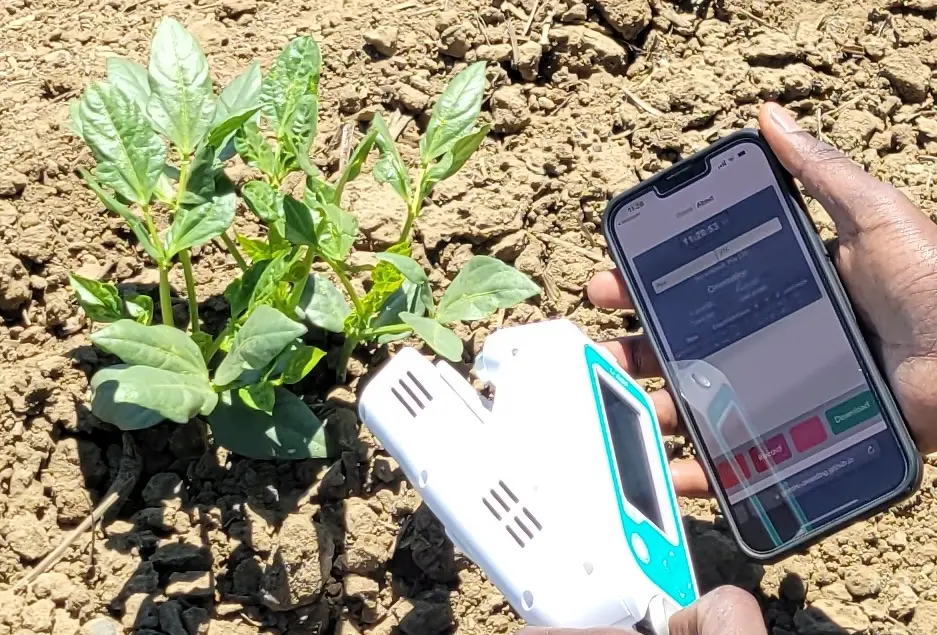
Leaf angle (the inclination of a leaf relative to a vertical or horizontal plane) is a key plant architectural trait that influences light interception, canopy photosynthesis efficiency, and crop yield modeling. Manually measuring it in the field is tedious and error-prone.
This post walks through how I designed and built a browser-based web app that uses a smartphone’s built-in IMU sensors to capture leaf angle data, export it as a CSV, and evolved through real field user feedback.
Background
GEMINI Project needed a way to quickly record leaf inclination angles across many crop plots, while keeping track of the crop name, plot number, and timestamp for each measurement. Existing solutions were either:
- Expensive dedicated hardware (inclinometers)
- Paper datasheets (error-prone, slow to digitize)
- Generic sensor apps that didn’t export structured CSV data
The goal was a free, zero-installation tool that any field worker could open directly in their phone’s browser and start recording.
Initial Design Plans
Before writing any code, I sketched out the initial UI and data flow. The goal was to keep the interface as simple as possible: a big “Record” button and a clear readout of the current angle.
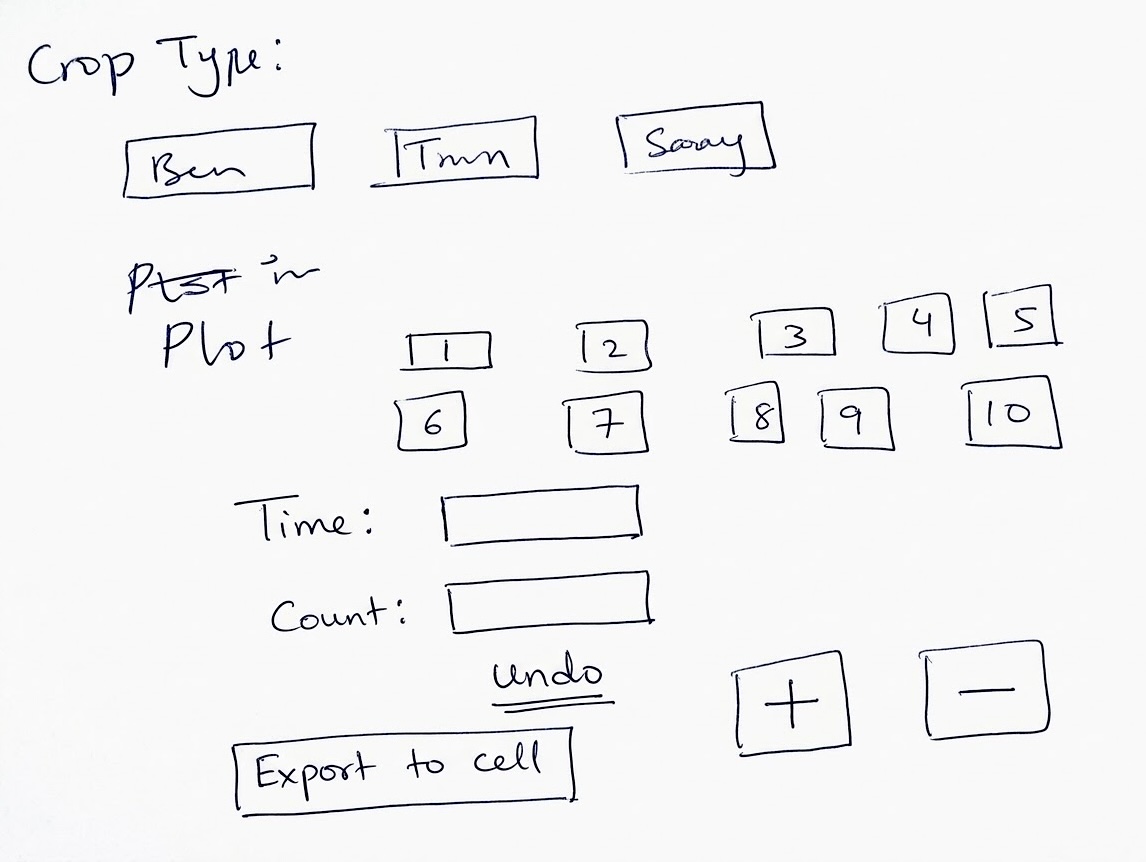
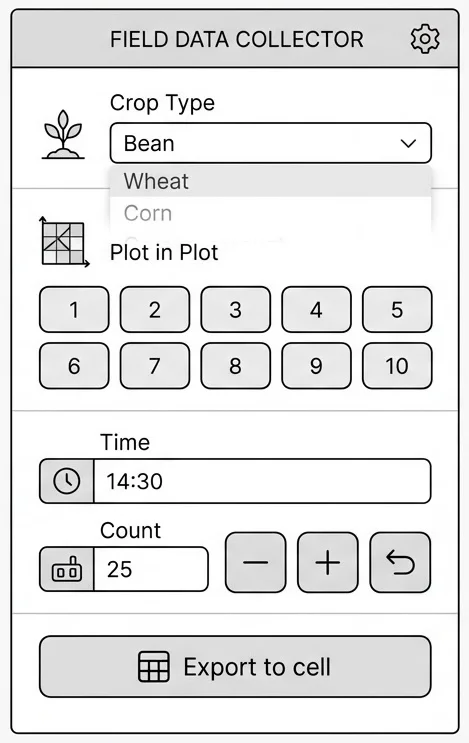
Idea
Smartphones already contain 3-axis accelerometers and gyroscopes. Web browsers expose these via the DeviceOrientationEvent API, which gives real-time pitch (β), roll (γ), and yaw (α) angles. A simple calculation converts these into a leaf angle value with respect to vertical.
The core idea: hold the phone flat against a leaf and press record.
- Works in any mobile browser (no app install)
- Customizable crop name and plot number
- Log timestamped measurements in a table
- Export data as a downloadable CSV file
- Usable one-handed in the field
First Draft
The first version was built as a vanilla JavaScript / HTML Progressive Web App (PWA). It subscribed to deviceorientation events and computed the leaf angle from the gravity vector components. A simple table below the sensor readout accumulated each recorded measurement.
Key technical steps in the first draft:
- Register a
deviceorientationabsoluteevent listener - Compute the leaf angle:
leafAngle = Math.acos(Math.cos(beta * Math.PI/180) * Math.cos(gamma * Math.PI/180)) * (180/Math.PI) - Render live X (β), Y (γ), Z (α), and computed leaf angle values
- On Record button press, push a row
{time, crop, plot, count, x, y, z, leafAngle}to an in-memory array and render the table - On Download, serialize the array to CSV using FileSaver.js
The control buttons (Start / Record / Undo / Download) were placed at the top of the screen in the initial layout.
Design Suggestion from Ismael
After sharing the first draft with the field team, Ismael Mayanja, a plant scientist who actively uses the app in field trials, provided detailed feedback via Slack (May 2023):
“Can we have the buttons (Start/Record/Undo) at the bottom of the screen instead of the top, it is easier to press them that way especially in the field.” “Can we also have both volume buttons to also record if I press them.” “Can we make both the crop ID and the plot number customizable so that a user is prompted with a keyboard.” “Digital clock showing at the top. A compass.”
Ismael also sent a hand-drawn wireframe sketch showing exactly how he envisioned the layout:
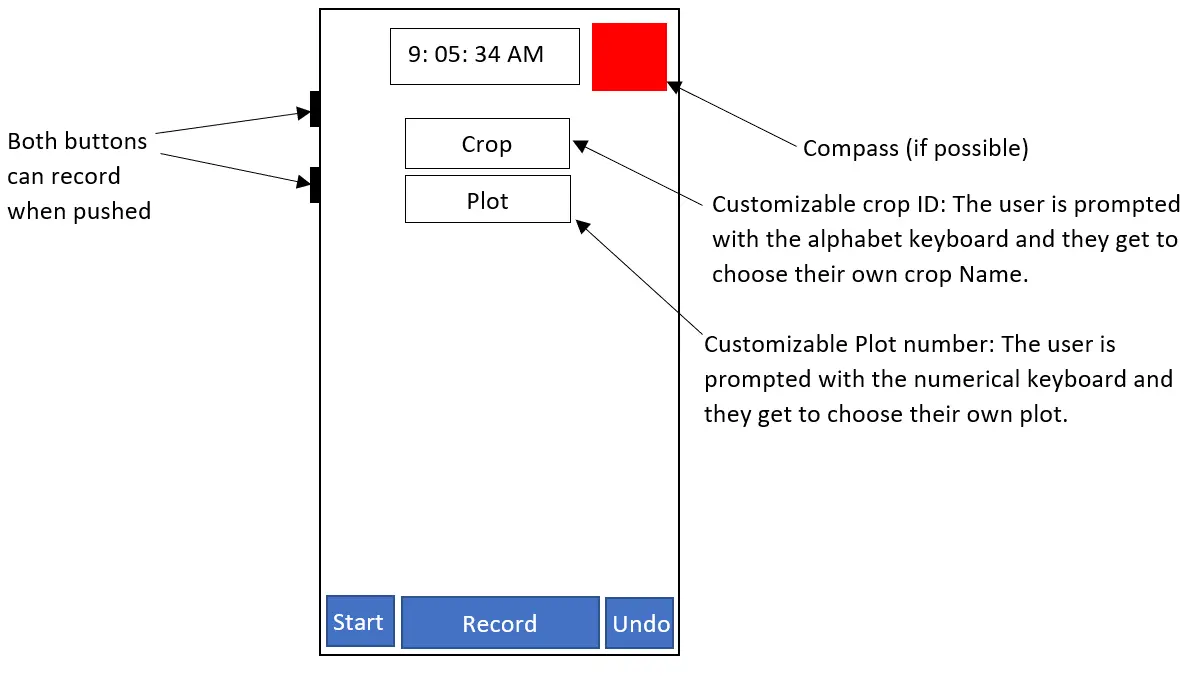
A follow-up message added three more issues to address:
- Pressing Download CSV wasn’t working.
- The latest recorded data should appear at the top of the table, not the bottom.
- Replace “Num. of data points” with “Count” so users can quickly see how many measurements they’ve taken.
Final Design
Incorporating Ismael’s feedback and subsequent field testing, the app evolved through two major iterations: the original 2023 release (v1) and the recent 2026 UI refresh (v2).
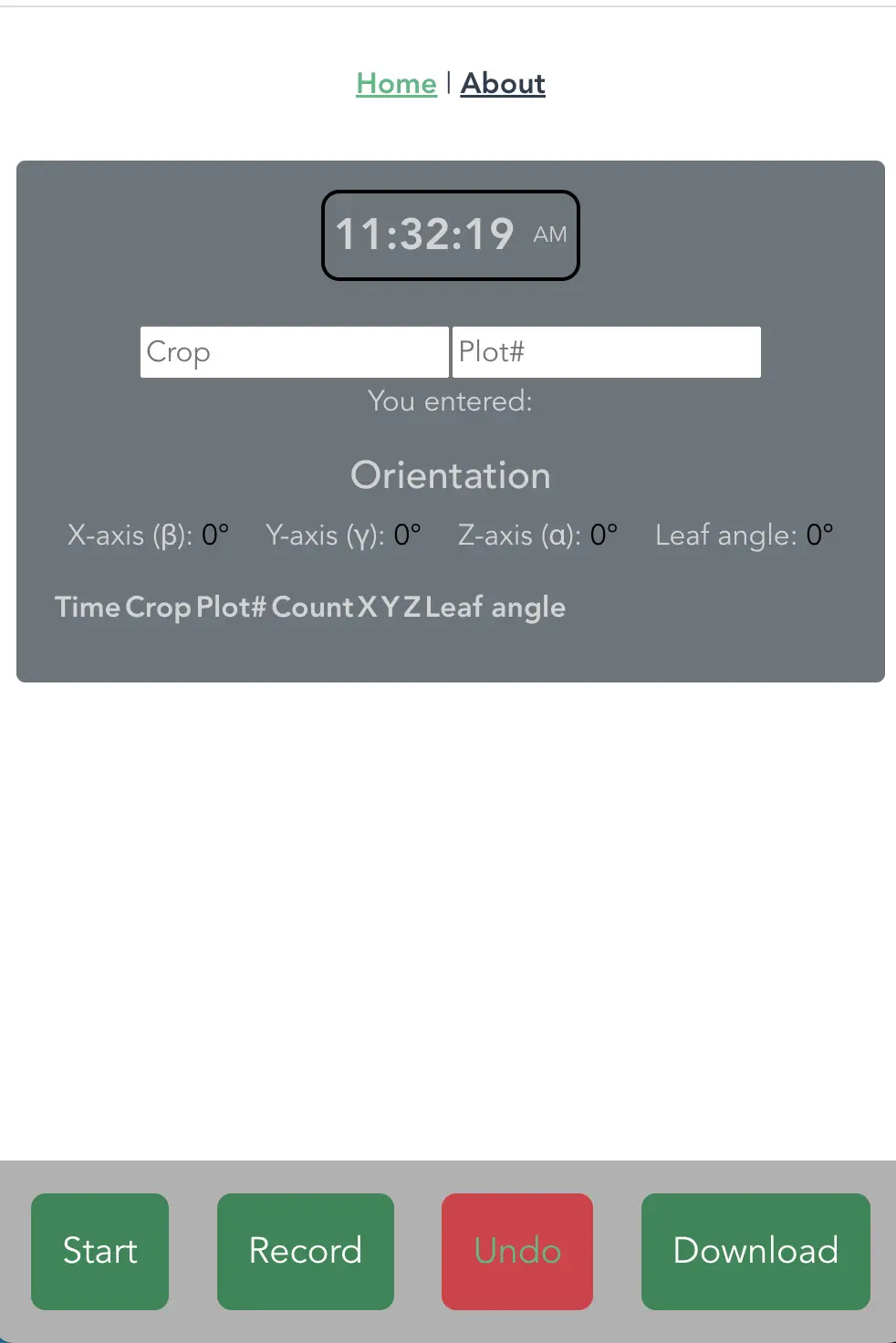
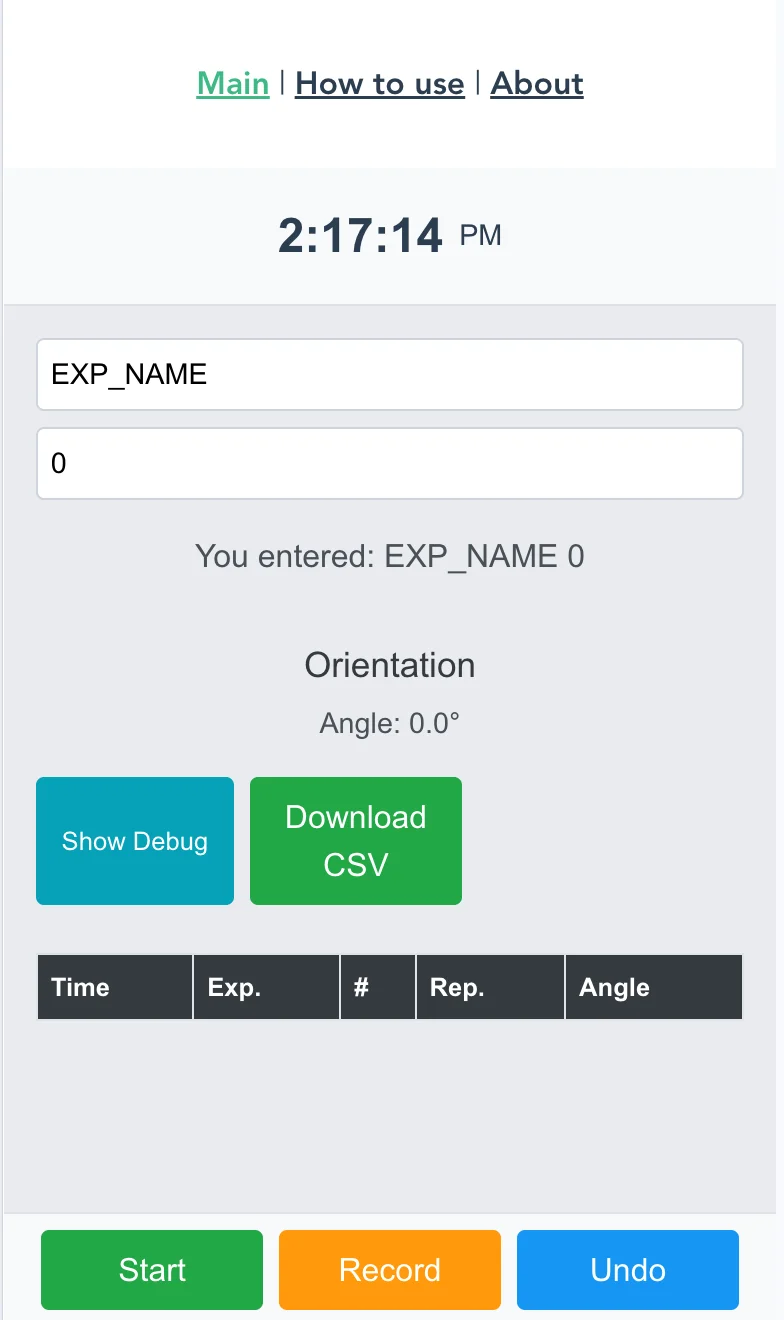
Changes implemented across iterations:
| Feature | Before | After |
|---|---|---|
| Button placement | Top | Bottom (thumb-friendly) |
| Volume buttons as record | ✗ | ✓ (both volume keys) |
| Crop / Plot ID | Fixed dropdown | Free-text input (keyboard prompt) |
| Digital clock | ✗ | ✓ (top center) |
| Compass | ✗ | ✓ (top right, if API available) |
| CSV download | Broken | Fixed via FileSaver.js |
| Data order in table | Oldest first | Newest first |
| Data count label | “Num. of data points” | “Count” |
Design Tools & Steps
Tools Used
| Tool | Purpose |
|---|---|
| HTML / CSS / JavaScript | Core app structure, styling, and logic |
| DeviceOrientationEvent API | Real-time IMU sensor data from the phone |
| DeviceMotionEvent API | Hardware volume button detection |
| Vue.js | Reactive UI framework for live data binding and component structure |
| @vueuse/core | Vue composables for device orientation (useDeviceOrientation) |
| FileSaver.js | Client-side CSV file download |
| GitHub Pages | Free static hosting for the PWA |
| Vite | Build toolchain for the Vue project |
Development Steps
- Prototype: Vanilla JS proof-of-concept to validate that
deviceorientationabsolutegives usable angles on Android and iOS. - Vue migration: Rewrote the app using Vue.js to clean up the reactive state (sensor readings → computed leaf angle → table rows).
- Installed
@vueuse/corefor device orientation hooks:npm i @vueuse/core - UI redesign: Moved controls to a fixed bottom bar, added digital clock at top, added free-text Crop and Plot inputs.
- CSV fix: Integrated FileSaver.js to correctly trigger the file download dialog:
npm i file-saver - Reverse table order: Changed the data array push to
unshift()so the latest reading always appears first. - Build & deploy: Built with Vite and pushed to GitHub Pages:
npm run build
# deploy dist/ to the gh-pages branch
You can save the app to your phone’s home screen for quick field access. It behaves like a native app:
On iPhone: Tap Share → Add to Home Screen
On Android: Tap the Browser Menu → Add to Home Screen
References
- MDN Web Docs: DeviceOrientationEvent
- MDN Web Docs: DeviceMotionEvent
- Vue.js: https://vuejs.org/
- VueUse: @vueuse/core (
useDeviceOrientationcomposable) - FileSaver.js: https://github.com/eligrey/FileSaver.js/
- Vite: https://vitejs.dev/
- GitHub Pages: https://pages.github.com/
- GEMINI Project at UC Davis: https://projectgemini.ucdavis.edu/